Search
Functions of Software
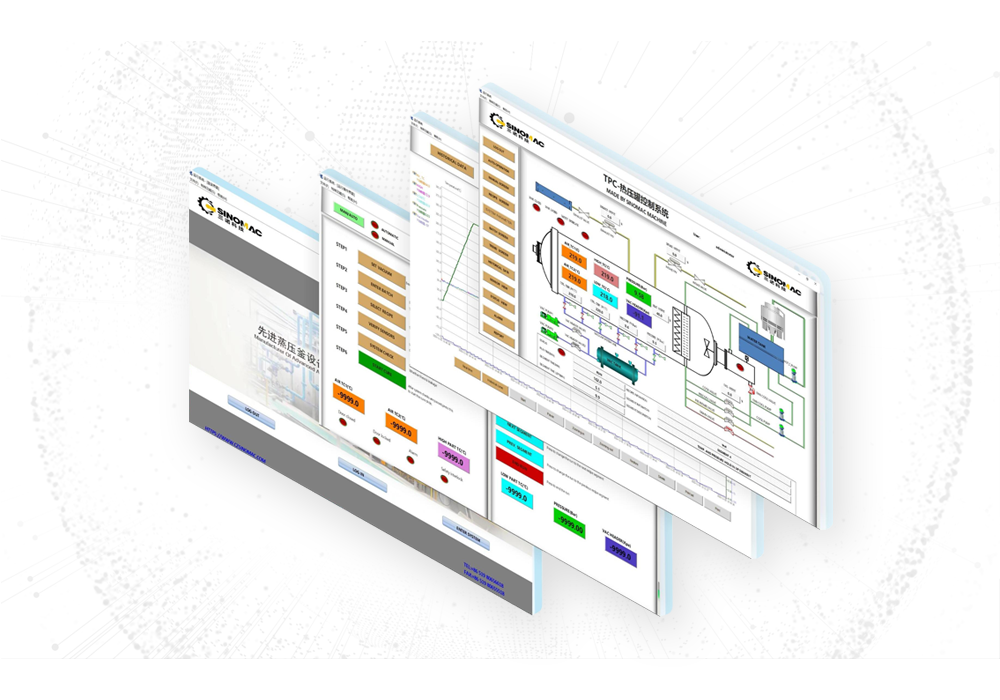
TPC software is a dedicated control system for autoclave composite curing based on the Microsoft Windows platform. Developed by SINOMAC by drawing on the strengths of various domestic and international control systems, it is a highly popular control system among customers, with basic functions including user permission login, component and sensor selection, curing curve recipe setting, recall, saving and printing, automatic and manual recipe execution, real-time data monitoring, recording, saving and printing, as well as alarm, quality analysis and report generation. The TPC control system has been updated annually since its launch to meet the evolving requirements of the composite industry. With reliable performance and powerful functions, it is a trustworthy application solution for customers.
Introduction
TPC software is a dedicated control system for autoclave composite curing based on the Microsoft Windows platform. Developed by SINOMAC by drawing on the strengths of various domestic and international control systems, it is a highly popular control system among customers. It has basic functions including user permission login, component and sensor selection, curing curve recipe setting, recall, saving and printing, automatic and manual recipe execution, real-time data monitoring, recording, saving and printing, as well as alarm, quality analysis and report generation. The TPC control system has been updated annually since its launch to meet the evolving requirements of the composite industry. With reliable performance and powerful functions, it is a trustworthy application solution for customers.
TPC software is a dedicated control system for autoclave composite curing based on the Microsoft Windows platform. Developed by SINOMAC by drawing on the strengths of various domestic and international control systems, it is a highly popular control system among customers. It has basic functions including user permission login, component and sensor selection, curing curve recipe setting, recall, saving and printing, automatic and manual recipe execution, real-time data monitoring, recording, saving and printing, as well as alarm, quality analysis and report generation. The TPC control system has been updated annually since its launch to meet the evolving requirements of the composite industry. With reliable performance and powerful functions, it is a trustworthy application solution for customers.
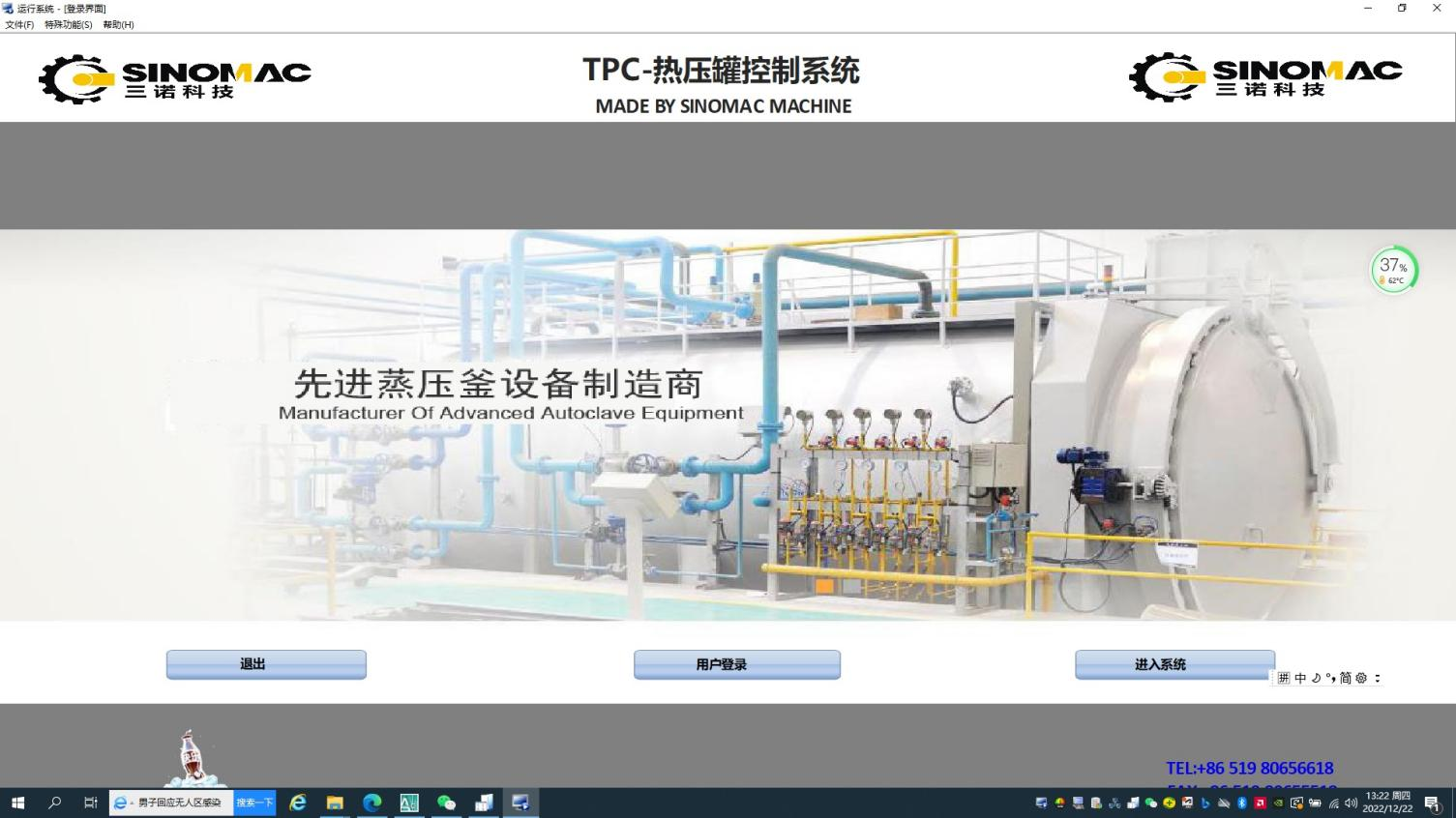
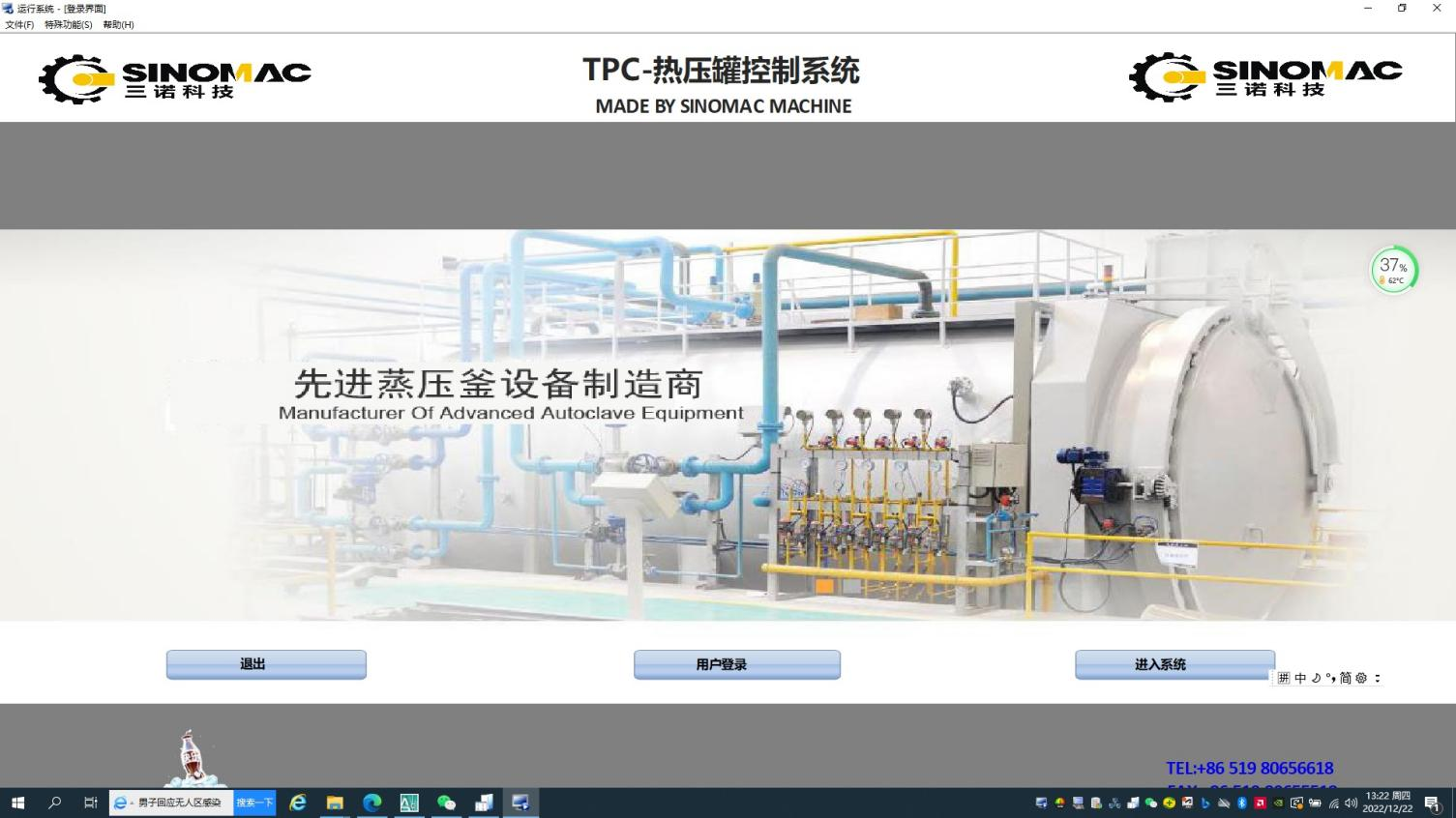
1.Login Interface
The system login is protected by password authentication. Operators are required to enter a valid username and password for secure system access.
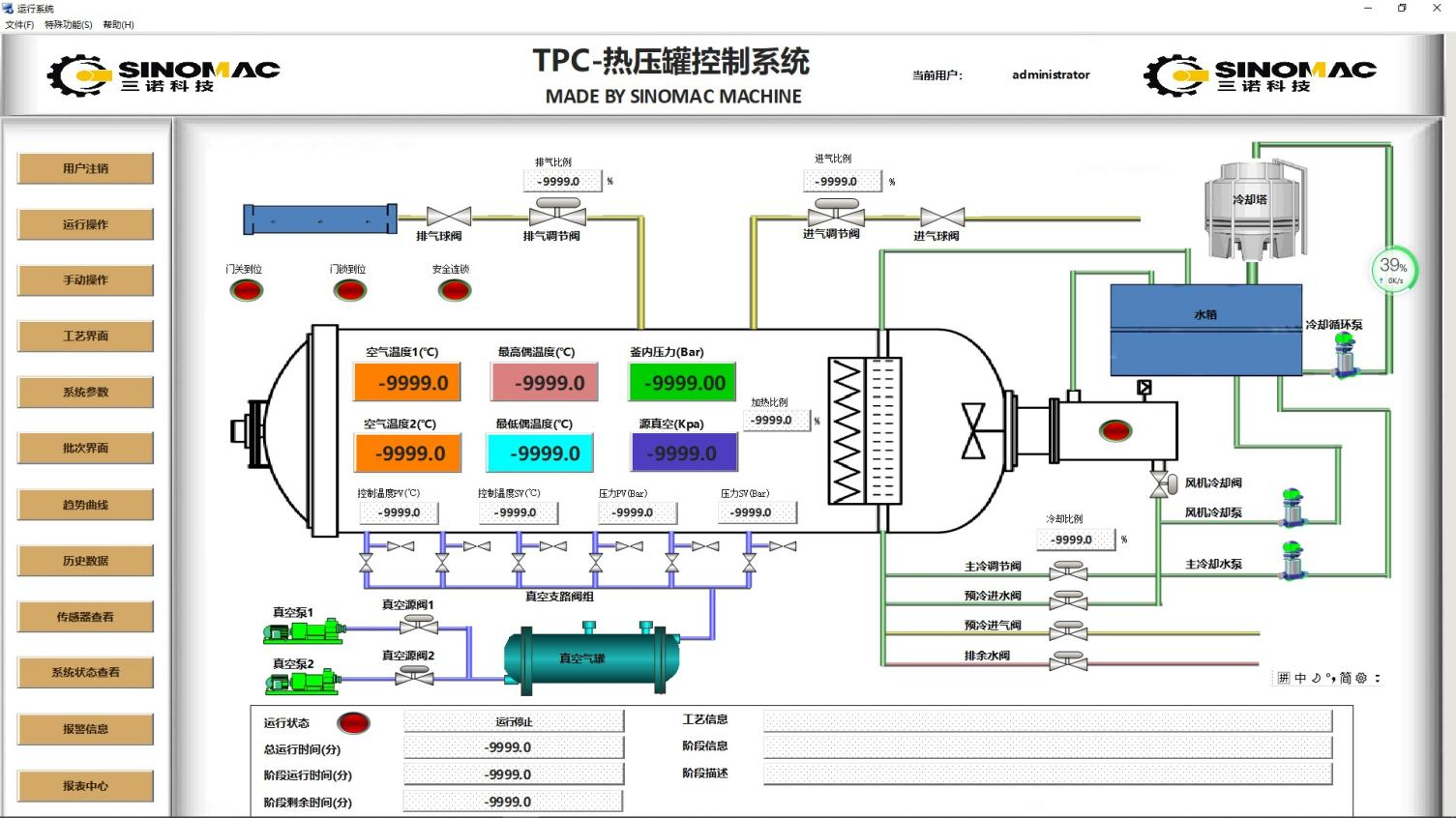
2.Home Interface
Real-time data is displayed centrally, including sensor readings, autoclave door and valve statuses, and current recipe information.
The left-side navigation bar allows access to all functional interfaces.
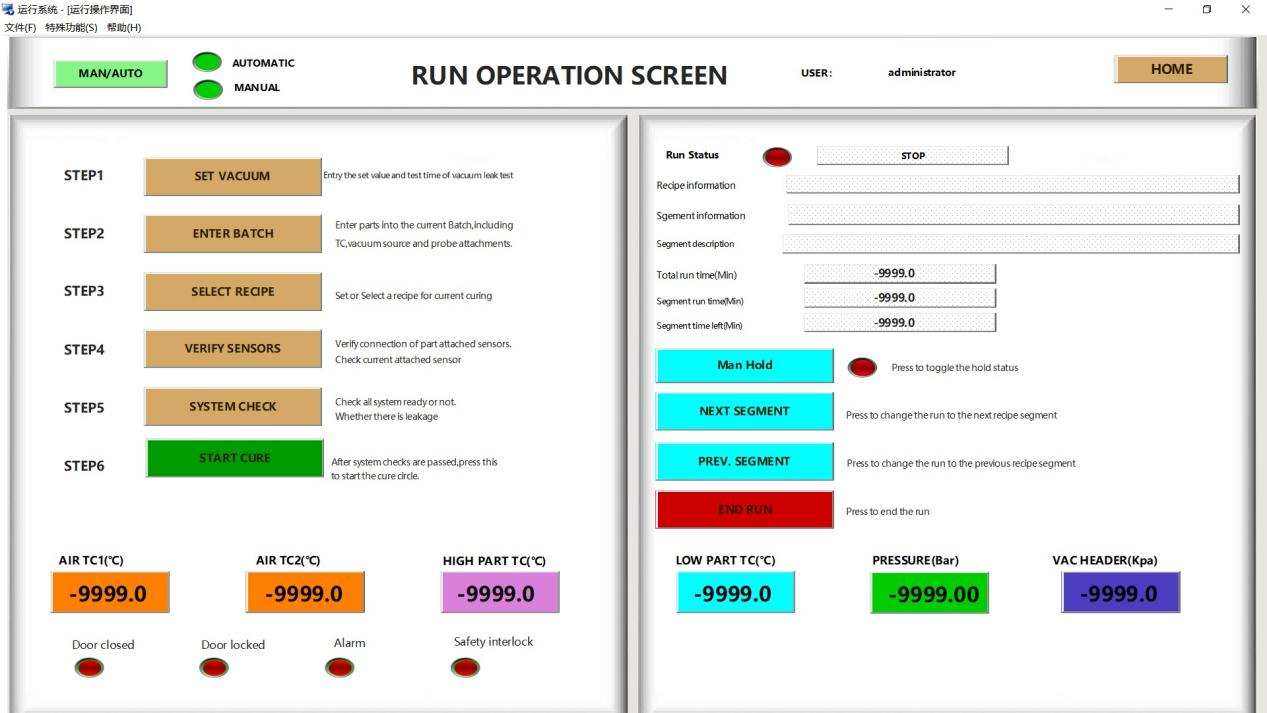
3.Automatic Operation Interface
The core hub for automated control.
It monitors operational status, facilitates pre-start preparations, and enables one-click recipe initiation.
Manual intervention functions are available, including pause, segment skip and recipe termination.
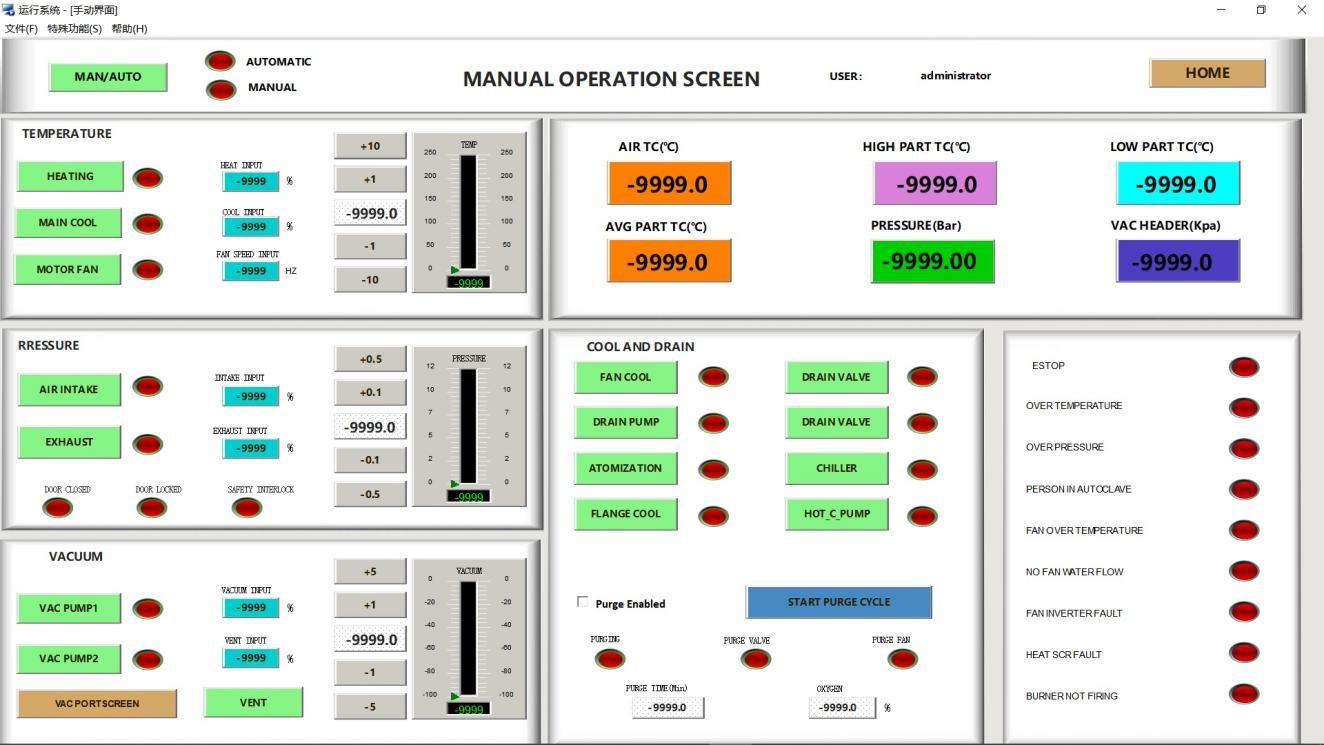
4.Manual Operation Interface
Designed for system debugging and special recipe execution.
Once manual mode is activated, individual components (heating, vacuum, pressure, etc.) can be controlled independently.
Built-in safety interlocks are incorporated to ensure operational safety.
5.Recipe Interface
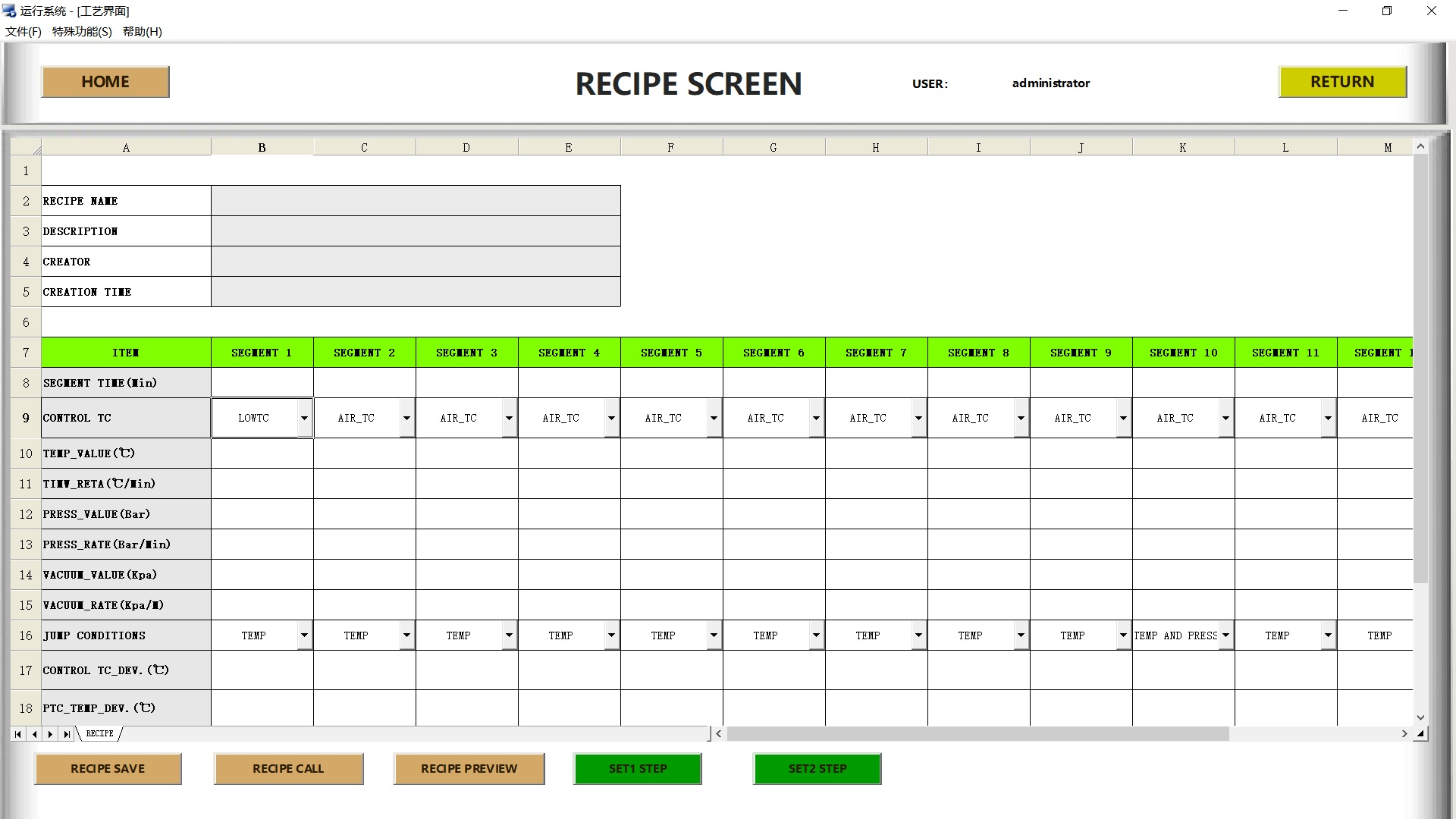
Create, edit and save recipe.
Set parameters (temperature, pressure, time, etc.) for each stage and send them to the controller.
The final stage is forced to be "End" to ensure operational safety.
6.System Parameters
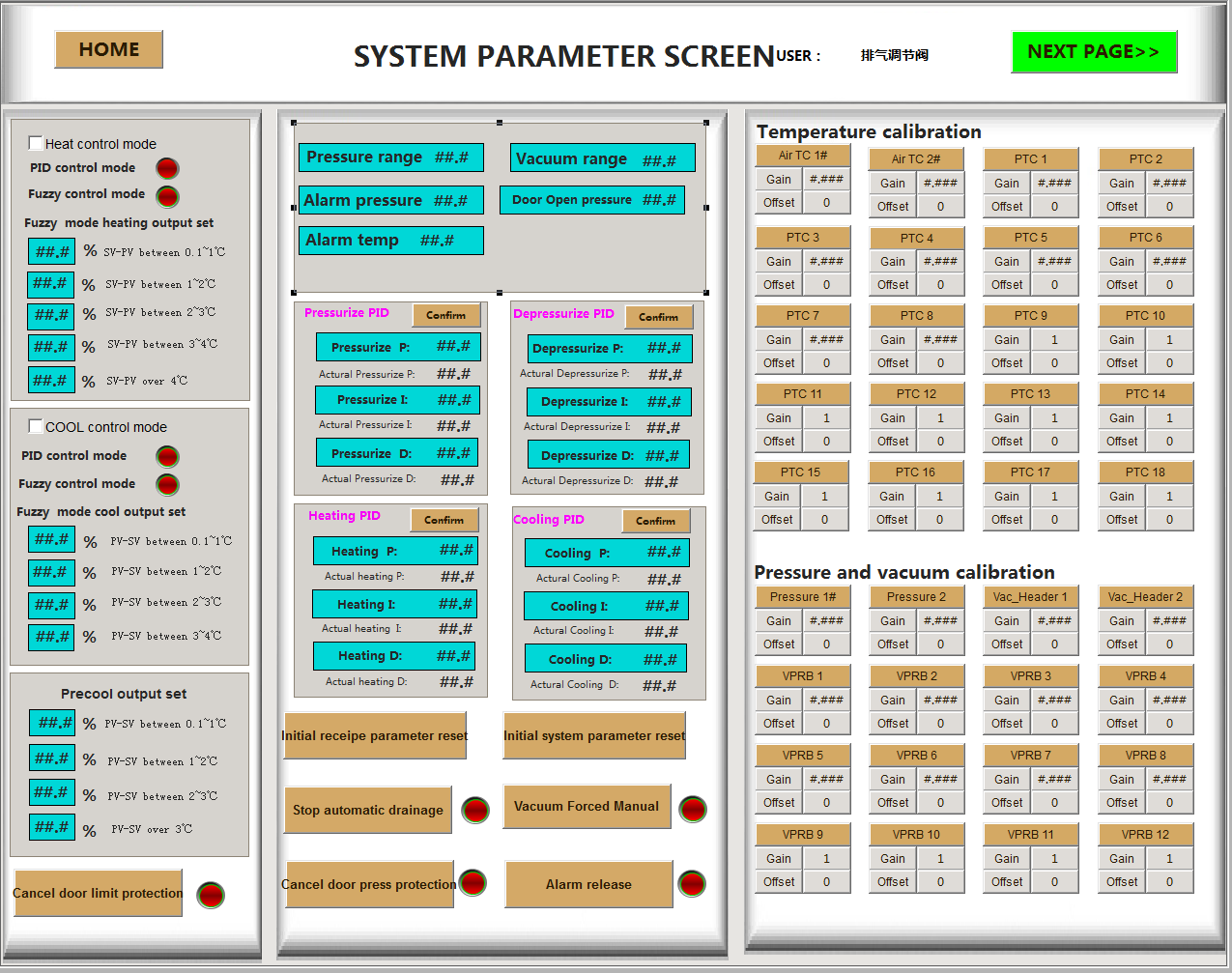
Sensor calibration and safety parameter configuration.
Management of safety protection options and system initialization.
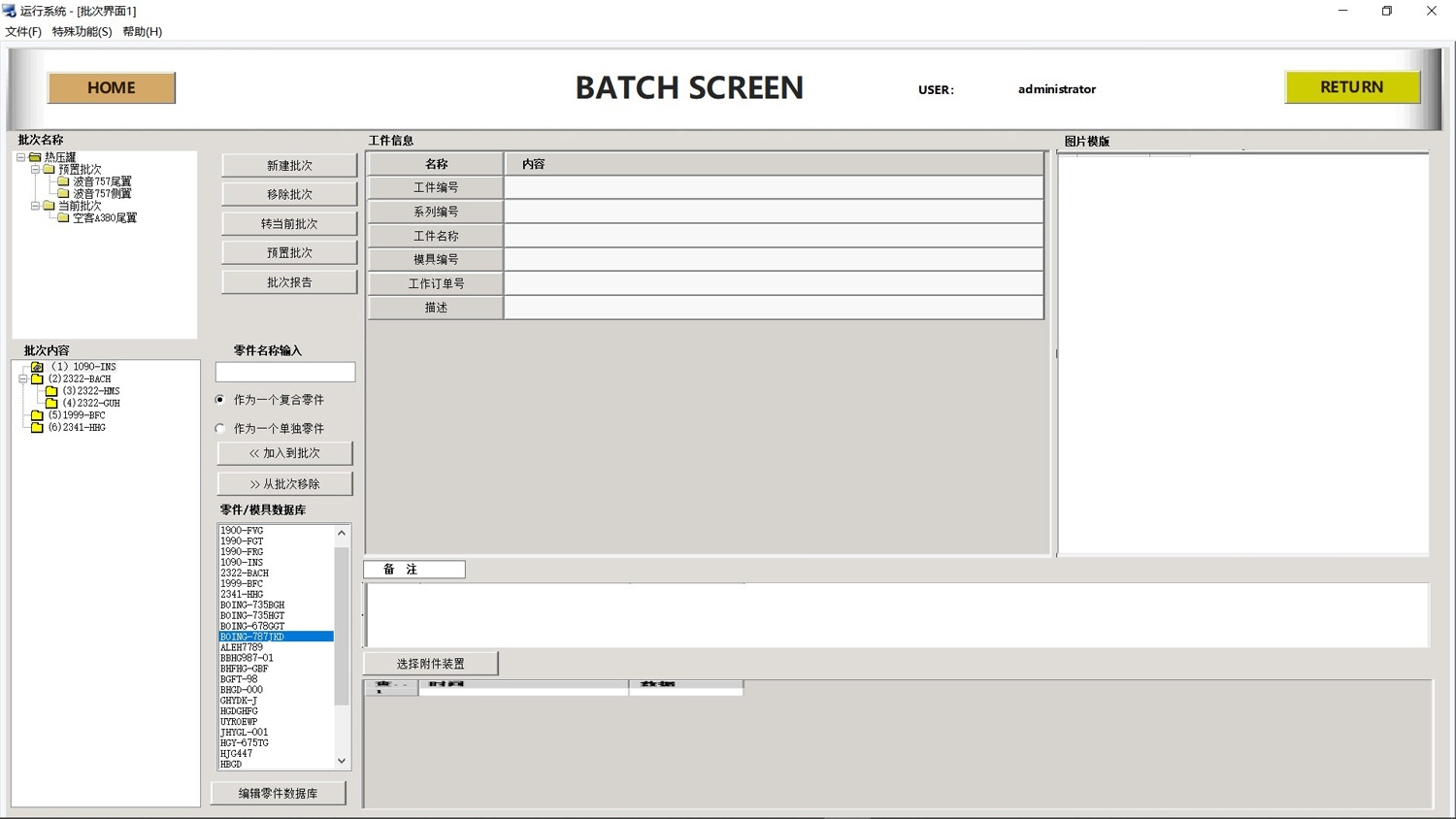
7.Batch Interface
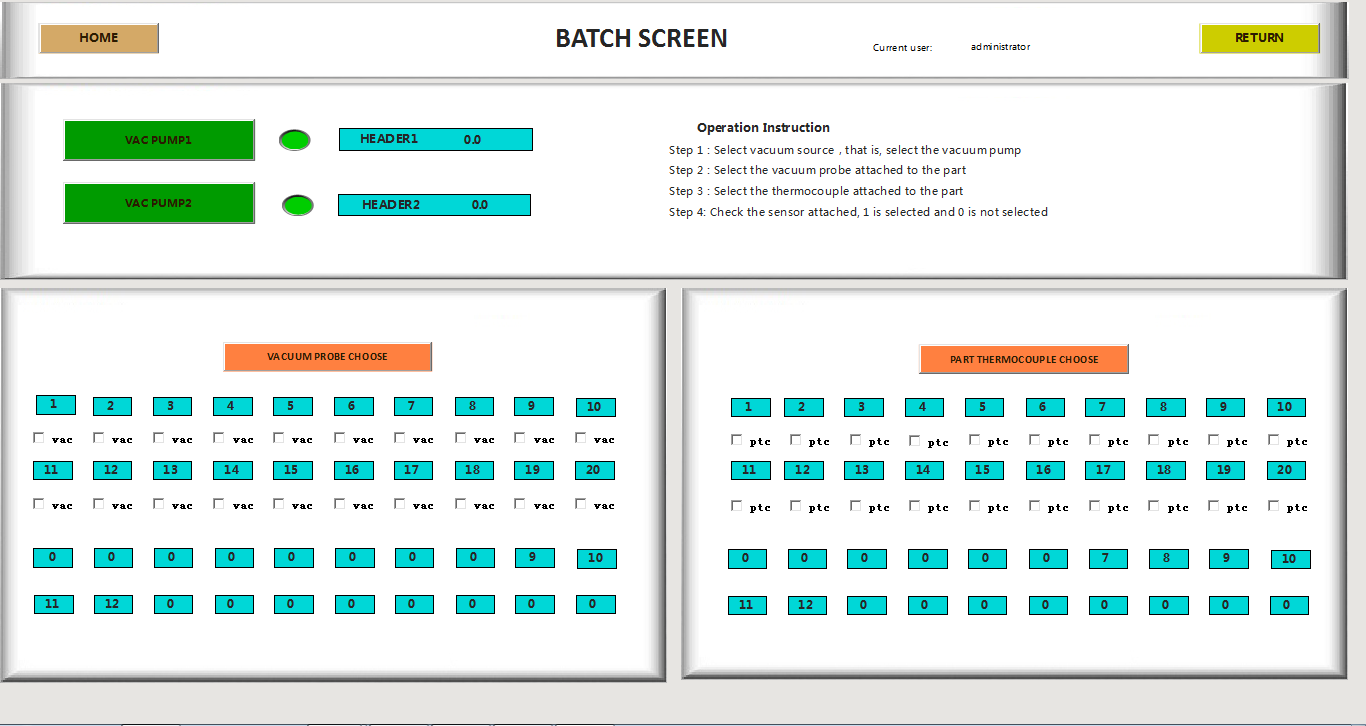
Configure vacuum sources and bind corresponding sensors for each production batch.
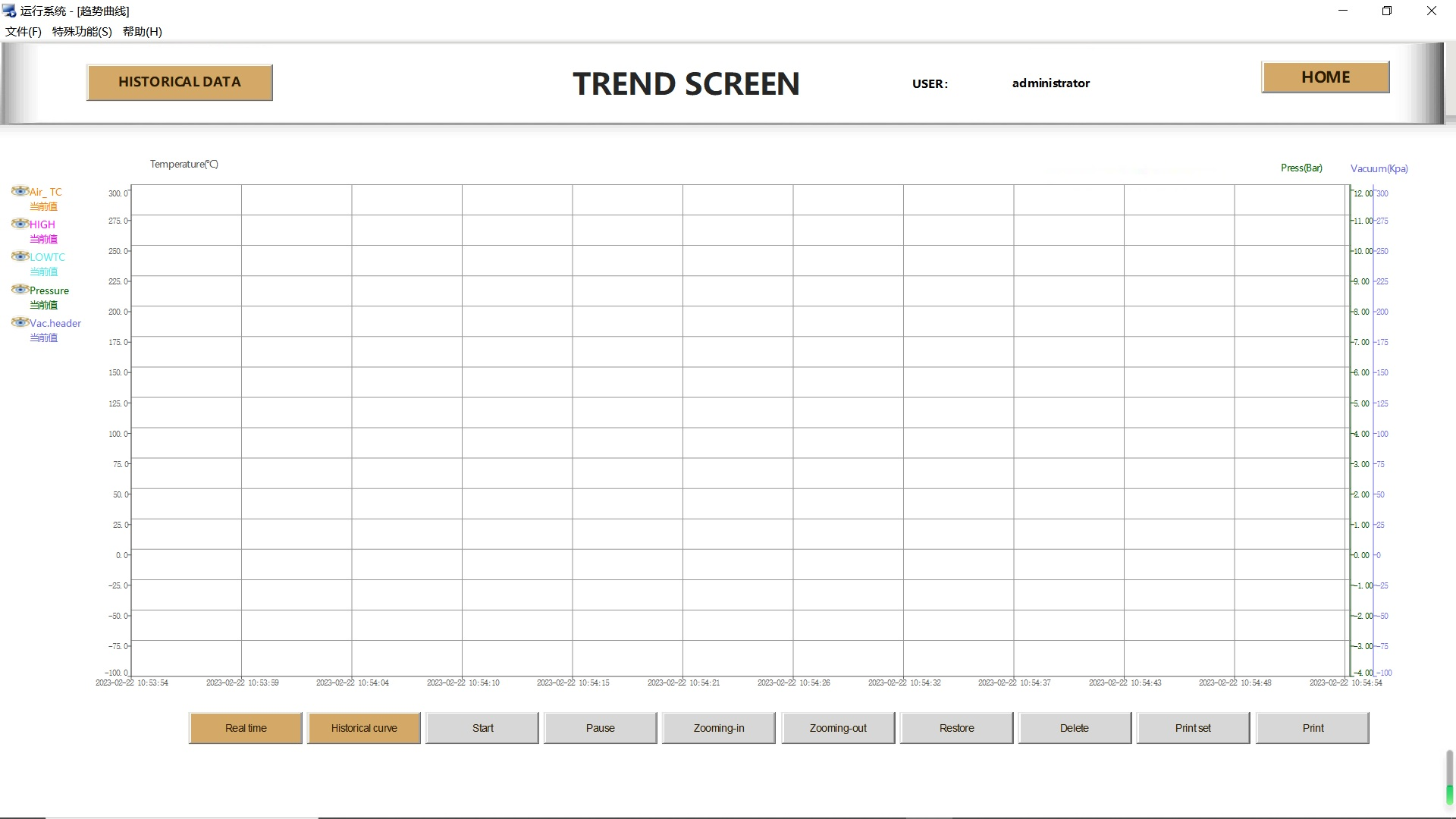
8.Trend Interface
Visualized data display module.
View real-time curves (within 1 hour) and historical curves for user-defined time periods.
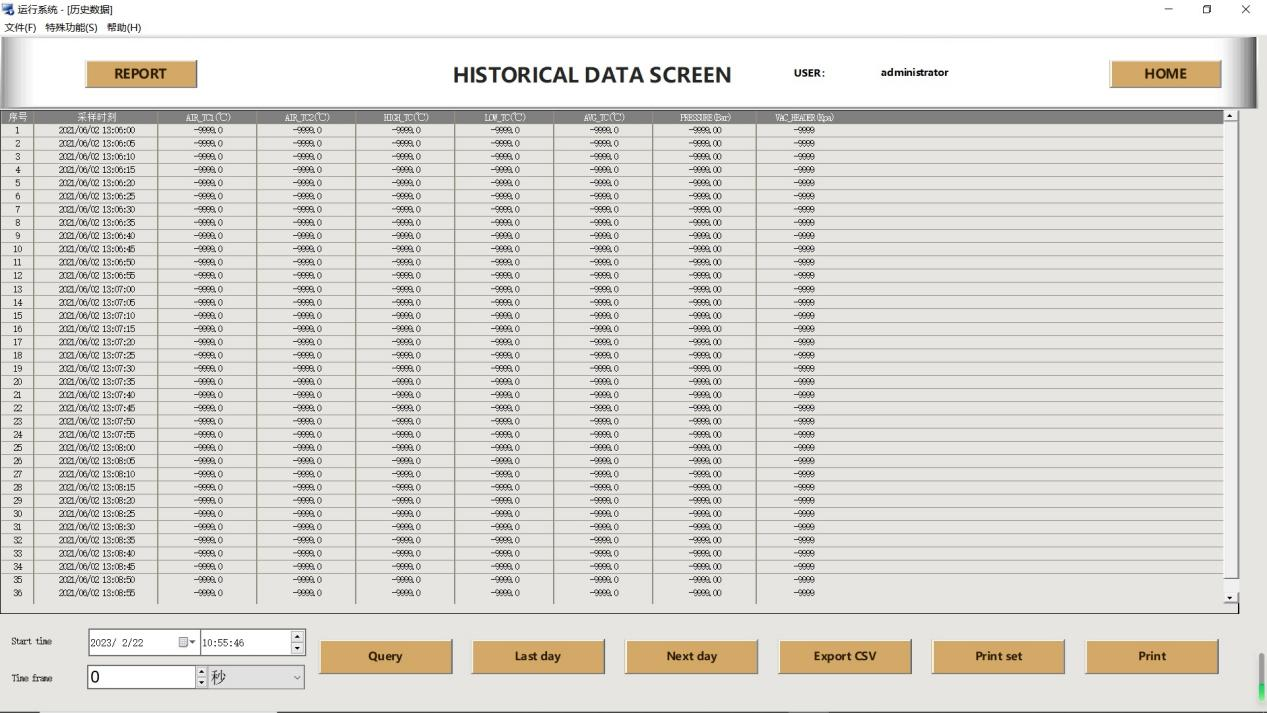
9.Historical Data Interface
Query historical operation records by time period.
Support data export in CSV format and printing function.
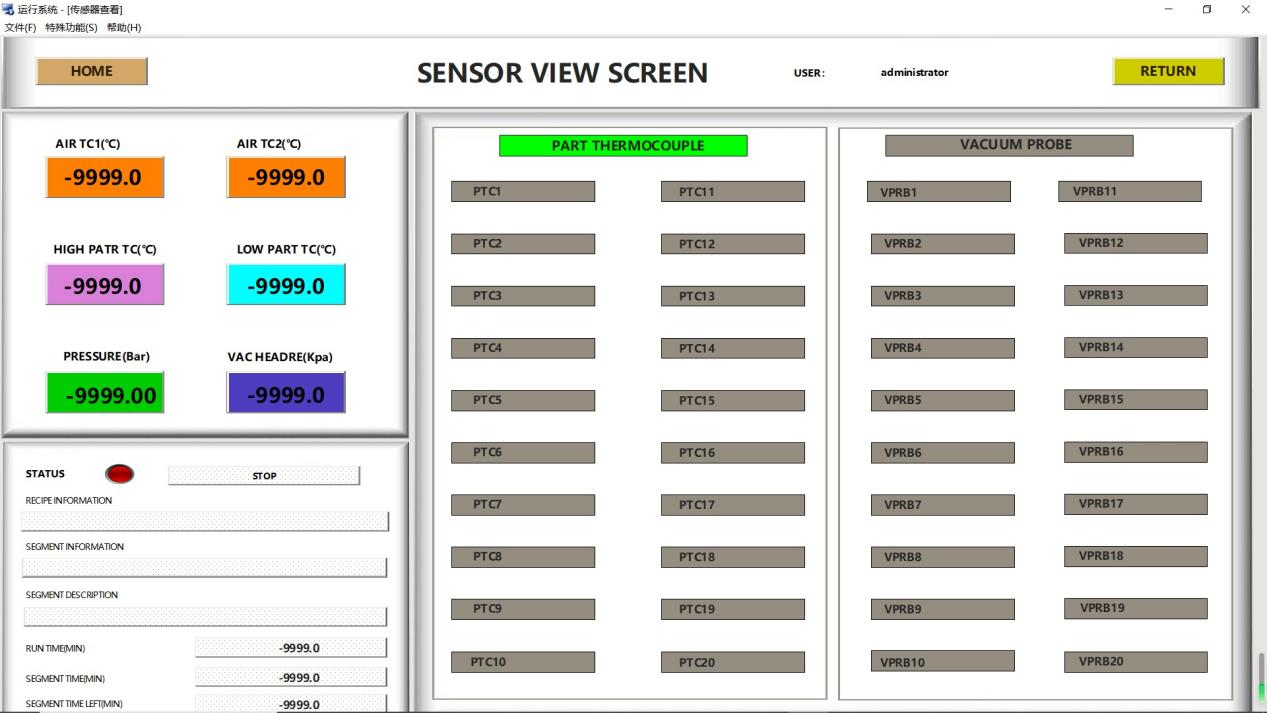
10.Sensor View Interface
Centralized display of real-time readings from all primary sensors.
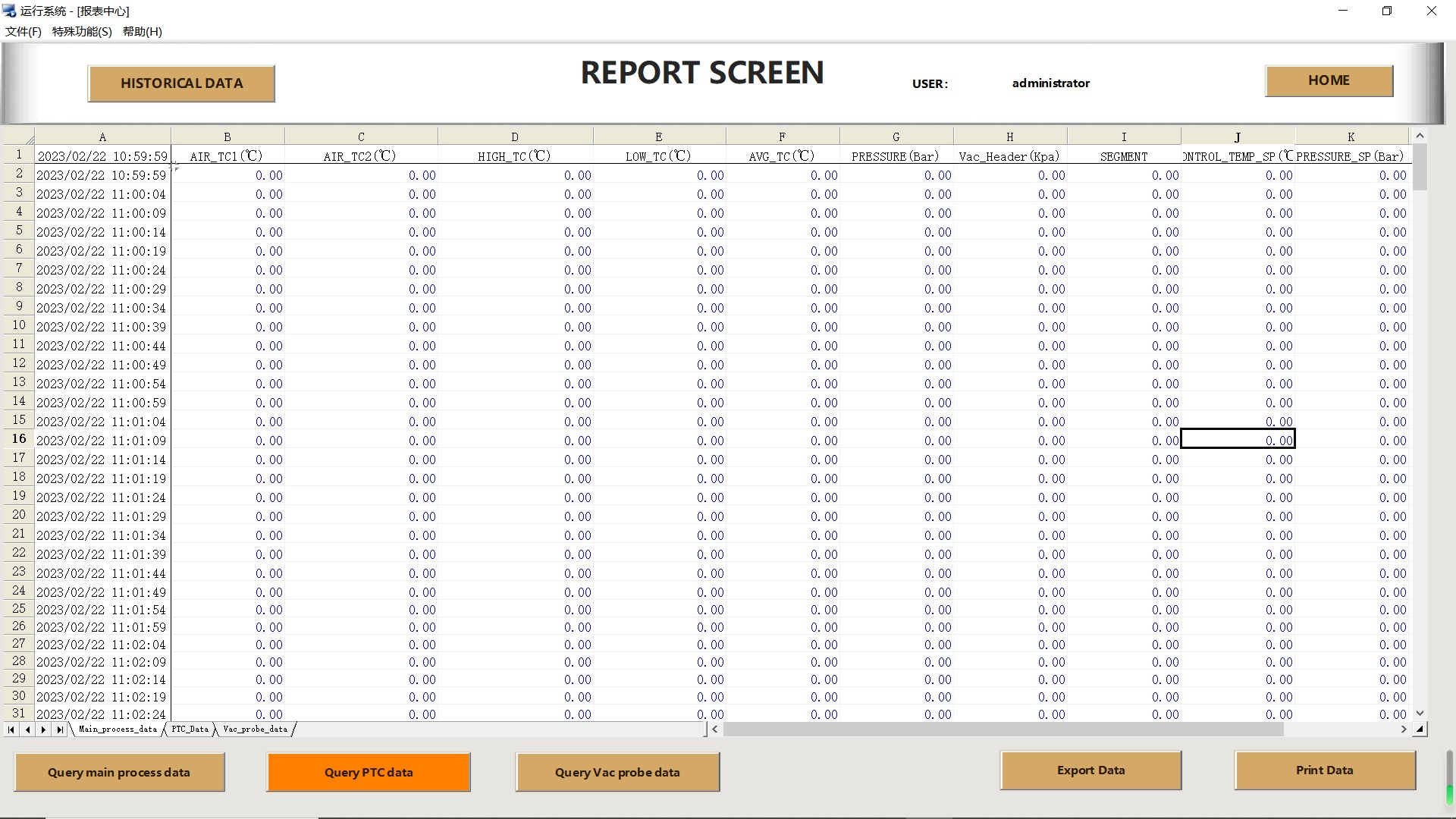
11.Report Interface
The report center is the system’s core module for generating and analyzing historical operation reports. Users can access this interface by clicking the Report Center button in the left navigation bar of the main page.
Efficient Batch Lifecycle Management
All production batches can be easily created, selected and managed via the left-side panel.
The Batch Content list displays all parts included in the current batch in real time, with clear visibility of status and support for quick adjustments.
Flexible Part & Batch Configuration
Rapidly select required items from the integrated part/mold database.
Easily assemble or adjust batch composition using the add and remove buttons.
Each part can be assigned a recipeing mode of Composite Part or Individual Part, with associated attachments and remarks to meet complex recipe requirements.
Unified Resource Database & Instant Maintenance
A robust built-in part and mold database serves as the central repository for all production resources.
The Edit Part Database function allows direct add, delete, modify and query operations within the interface, ensuring data is always up-to-date and maintenance is extremely convenient.
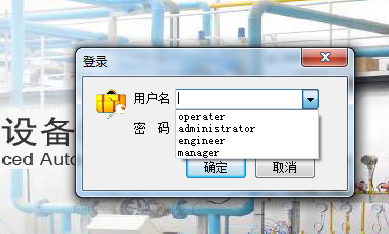
The TPC system ensures data security and operational compliance through a comprehensive permission management mechanism. Adhering to the principle of least privilege, the system grants users of different roles the minimum permissions necessary to fulfill their duties. This approach greatly safeguards data confidentiality and mitigates operational risks arising from erroneous operations.
Role | Operation Software | Configuration Software | Modify System Parameters |
Operator | ✅ | ❌ | ❌ |
Engineer/Manager | ✅ | ✅ | ❌ |
Administrator | ✅ | ✅ | ✅ |
The customized operation function equips users with flexible manual control capabilities, supporting independent parameter setting and precise regulation of each component of the autoclave system.
Ideal for equipment debugging, component inspection and special recipe scenarios, this function grants users a higher degree of operational freedom.
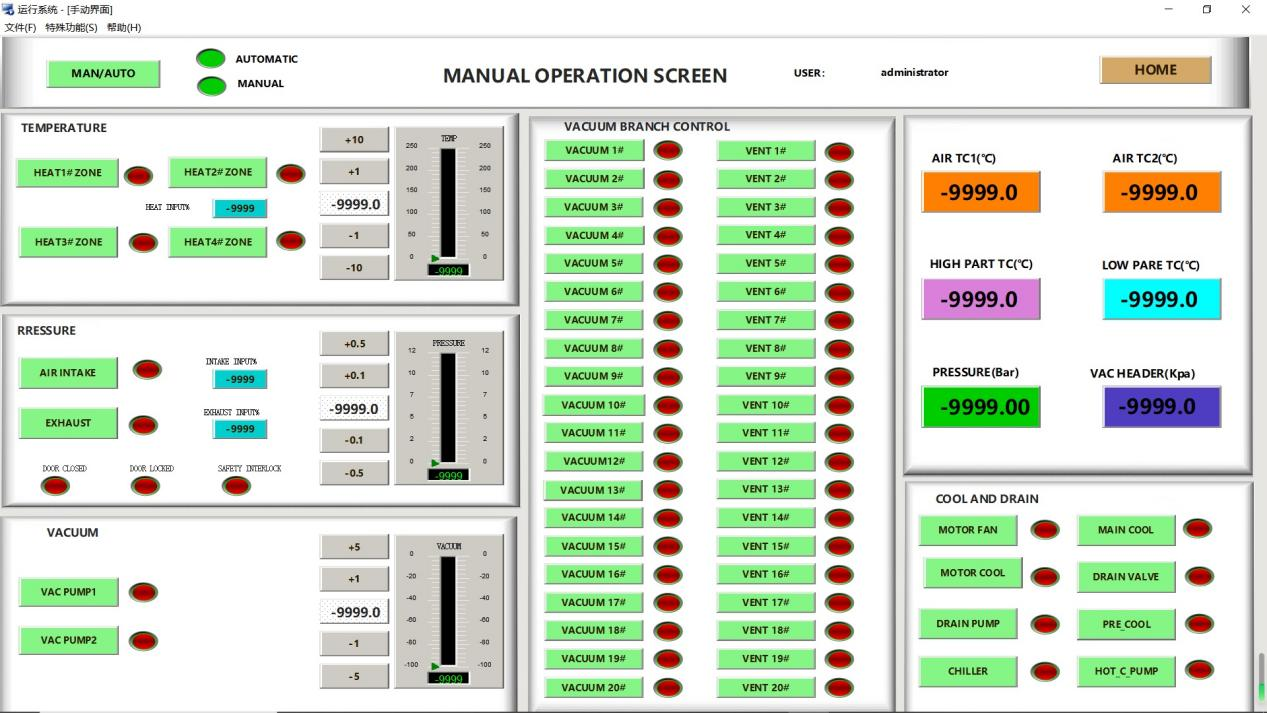
Pressure Regulation Function
It features a dual-control mode, supporting independent operation of air intake and exhaust. Users can set a target pressure value and finely adjust the output ratio of the intake valve. The system automatically verifies the autoclave door status and safety interlock signals to ensure safe and reliable operation.
Vacuum Control Module
It enables one-click vacuum pump control and supports user-defined target vacuum levels. Equipped with the function of independent management for multiple vacuum branches, users can selectively activate specific vacuum paths to meet diverse recipe requirements.
Cooling and Drainage System
It integrates multiple cooling methods, including a circulating fan, main cooling valve and chiller. An intelligent drain valve is provided to remove residual moisture, and a hot water circulating pump ensures the efficient operation of the cooling system, maintaining the equipment in optimal working condition.
All functional modules adopt an intuitive status indicator light design (red for running/green for stopped). Through an intelligent linkage mechanism, the system is guaranteed to operate safely and stably, providing users with a flexible and reliable manual control experience.
Features and Advantages
Status Visualization
All control functions are equipped with dual-color status indicators (red for running, green for stopped), providing users with intuitive status feedback and facilitating real-time monitoring of system operation.
Safety Interlock Protection
Each functional module is built with an integrated safety detection mechanism, which automatically verifies key parameters including autoclave door status, safety interlock signals and flow switches, ensuring all operations are carried out under safe conditions.
Flexible Configuration Capability
Users can independently set key parameters such as temperature, pressure and vacuum level according to specific recipe requirements, enabling highly customized operation schemes.
With refined control options and intelligent safety mechanisms, the customized operation function delivers a safe, flexible and efficient manual operation experience for users. It serves as an ideal tool for addressing special recipe requirements and performing system debugging.
The automatic operation function provides a program for setting up and initiating automated curing cycles. Being fully configurable, the program can be customized to meet the specific requirements of different clients.
The recipe steps include vacuum connection to the product, product loading, integrity checks (such as leak testing and on-site inspection), as well as any other procedures that the client may wish to incorporate into the automation sequence.
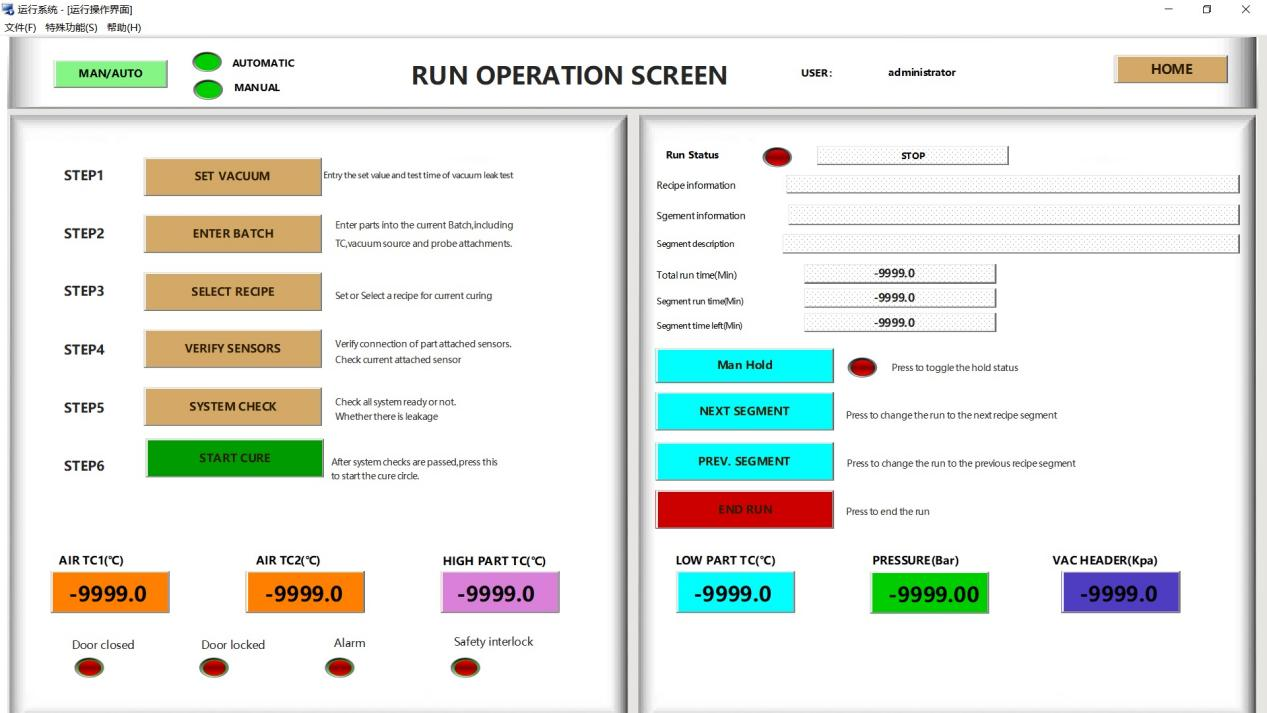
The automatic operation interface displays the following information:
Operation Status: Indicates the current status of the workflow, showing either Stopped or Running.
Recipe Information: Displays the name and description of the active recipe.
Stage Information: Shows the current stage of operation, e.g., Stage 1.
Stage Description: Provides a descriptive label for the current stage, e.g., Cooling Stage, Heating Stage, Holding Stage, etc.
Total Operation Time (min): Indicates the elapsed time of the entire recipe in minutes.
Stage Operation Time (min): Indicates the elapsed time of the current stage in minutes.
How to Set Up and Initiate Operation
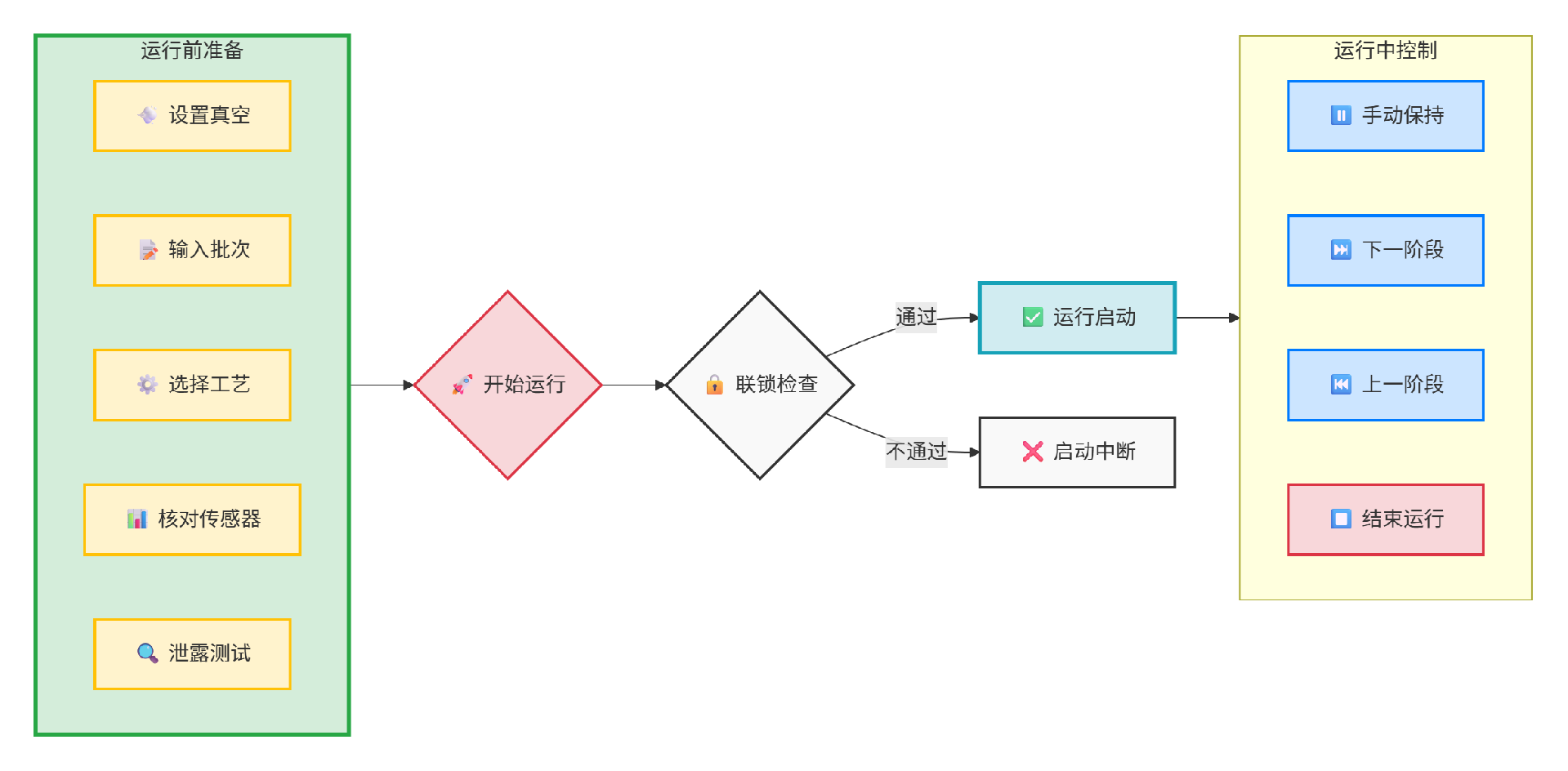
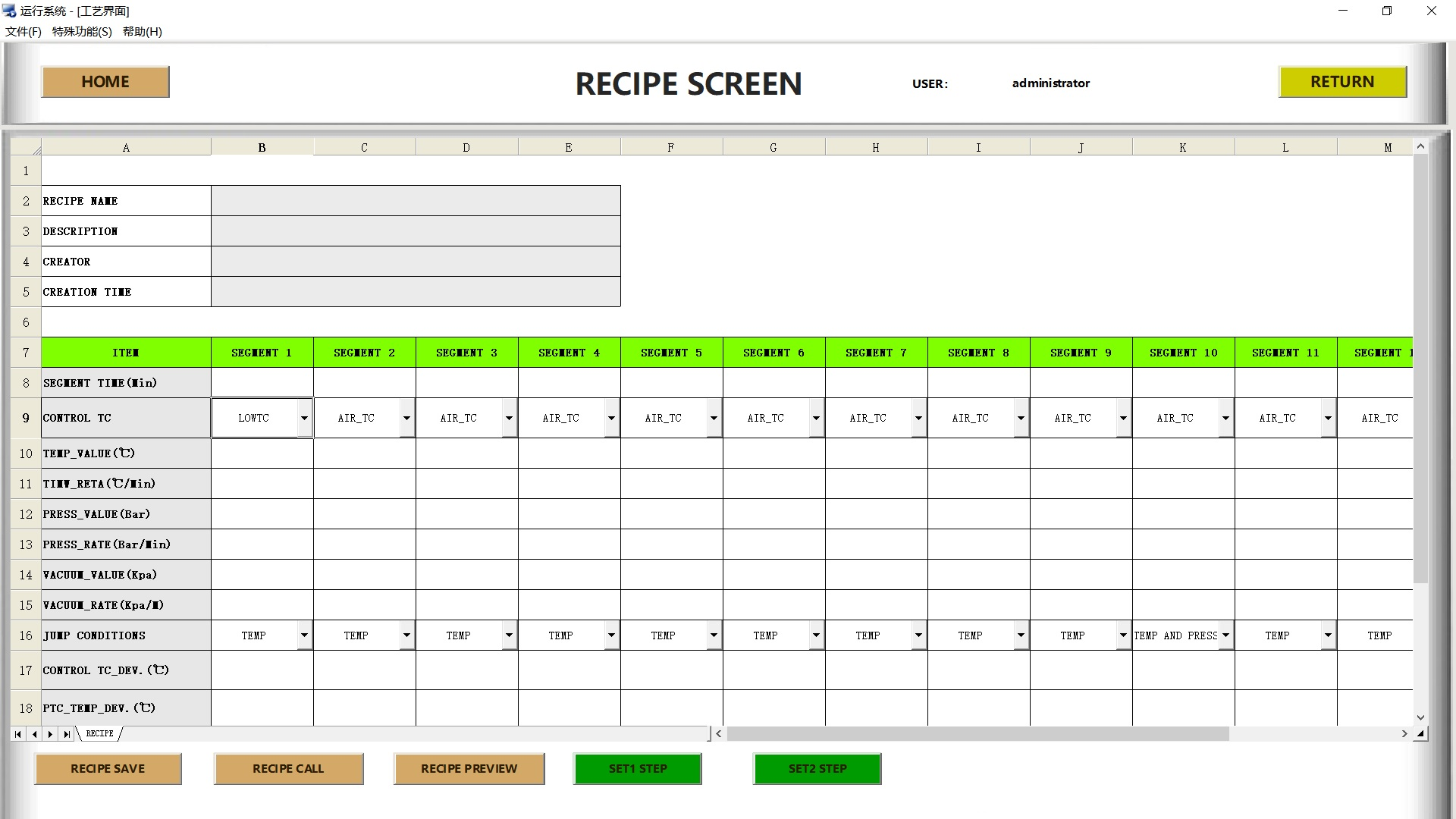
Image <6>Recipe interface
What is a Recipe?
A recipe is a step-by-step procedure that automatically replicates the required steps for operating or controlling equipment. The steps within a recipe are referred to as stages, and each setting within a stage is called a parameter.
Recipe Information
Recipe information mainly includes recipe name, recipe description, creator and creation time. Among these, the recipe name can be user-defined. The recipe description is a textual explanation of the recipe; it is recommended that the description provide general information about the recipe rather than simply repeating the recipe name. The creator and creation time record the operator's name and the exact time when the recipe was created, respectively.
The steps to create a new recipe are as follows: first, enter the above-mentioned recipe information items step by step; next, input the specific parameter data for each stage; finally, click the recipe save button to store the complete recipe in the computer hard drive.
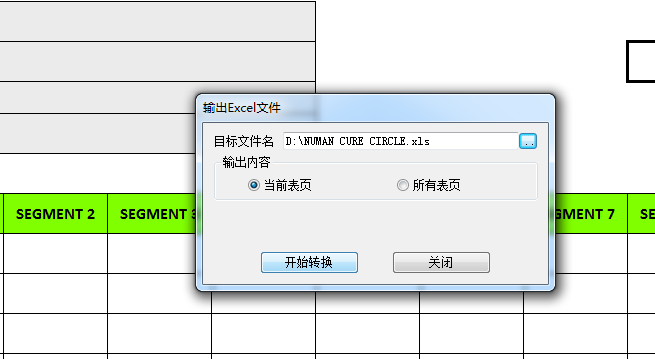
When uploading a new recipe to the PLC system, there are usually two starting methods: first, create a new recipe directly on the operation interface; second, load a stored recipe file via the Recipe Call button. Subsequently, click the Step 1 Setup and Step 2 Setup buttons in sequence to complete the transmission of the recipe to the PLC.
To modify an existing recipe in the PLC online, you can directly adjust the relevant parameters and information in the system, then click the Save Recipe button to store the updated version on the computer hard drive. Reload the modified recipe through Recipe Call, and execute Step 1 Setup and Step 2 Setup in sequence to make the changes take effect.
To confirm that the recipe data has been successfully transmitted to the PLC, you can click the Recipe Preview button to enter the preview interface after completing the setup operations, where you can view and verify the current recipe status and specific data in the PLC.
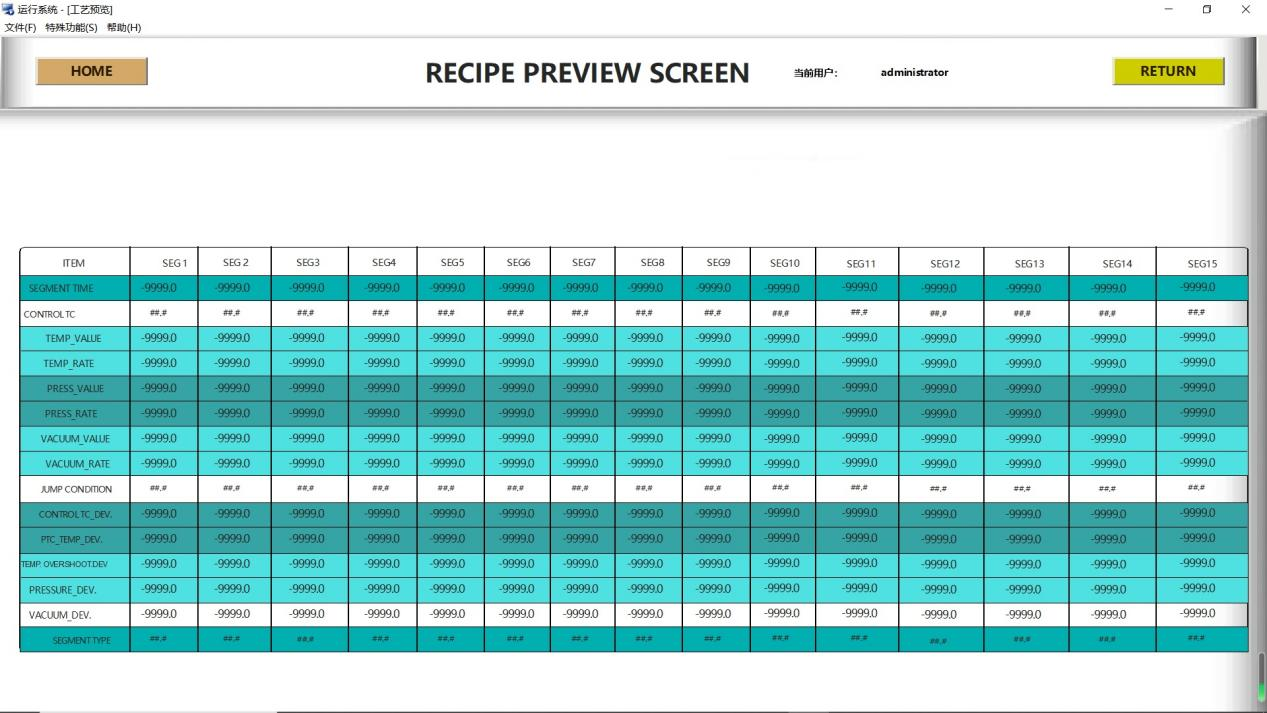
Recipe Parameters
Stage Time (Min)
Defines the duration of a stage, starting at the stage initiation. The system automatically proceeds to the next stage upon completion.
Target Temperature (℃)
Sets the target temperature for the air control thermocouple, independent of the actual stage and only subject to the programmed rate.
Temperature Rate (℃/Min)
Defines the heating rate of the temperature control group. The system attempts to raise the air control thermocouple temperature to the target at this rate during operation.
Target Pressure (Bar)
Sets the target pressure for the pressure control group, independent of the actual stage and only subject to the programmed rate.
Pressure Rate (Bar/Min)
Defines the pressure rise rate of the pressure control group. The system attempts to increase the pressure setpoint to the target at this rate during operation.
Vacuum Pressure (Kpa)
Sets the target vacuum pressure for the vacuum control group, independent of the actual stage.
Stage Type
Defines the Recipe stage type: Heating, Cooling, End.
· Select Heating for heating/heating-holding stages
· Select Cooling for cooling/cooling-holding stages
· Select End for the final stage (Mandatory: all recipes must end with this type to avoid operation errors)
As the core module of the software, it provides a centralized platform for data report generation and analysis. Users can accurately locate the report to be exported via the query function; clicking it will pop up a query dialog for entering filter criteria.
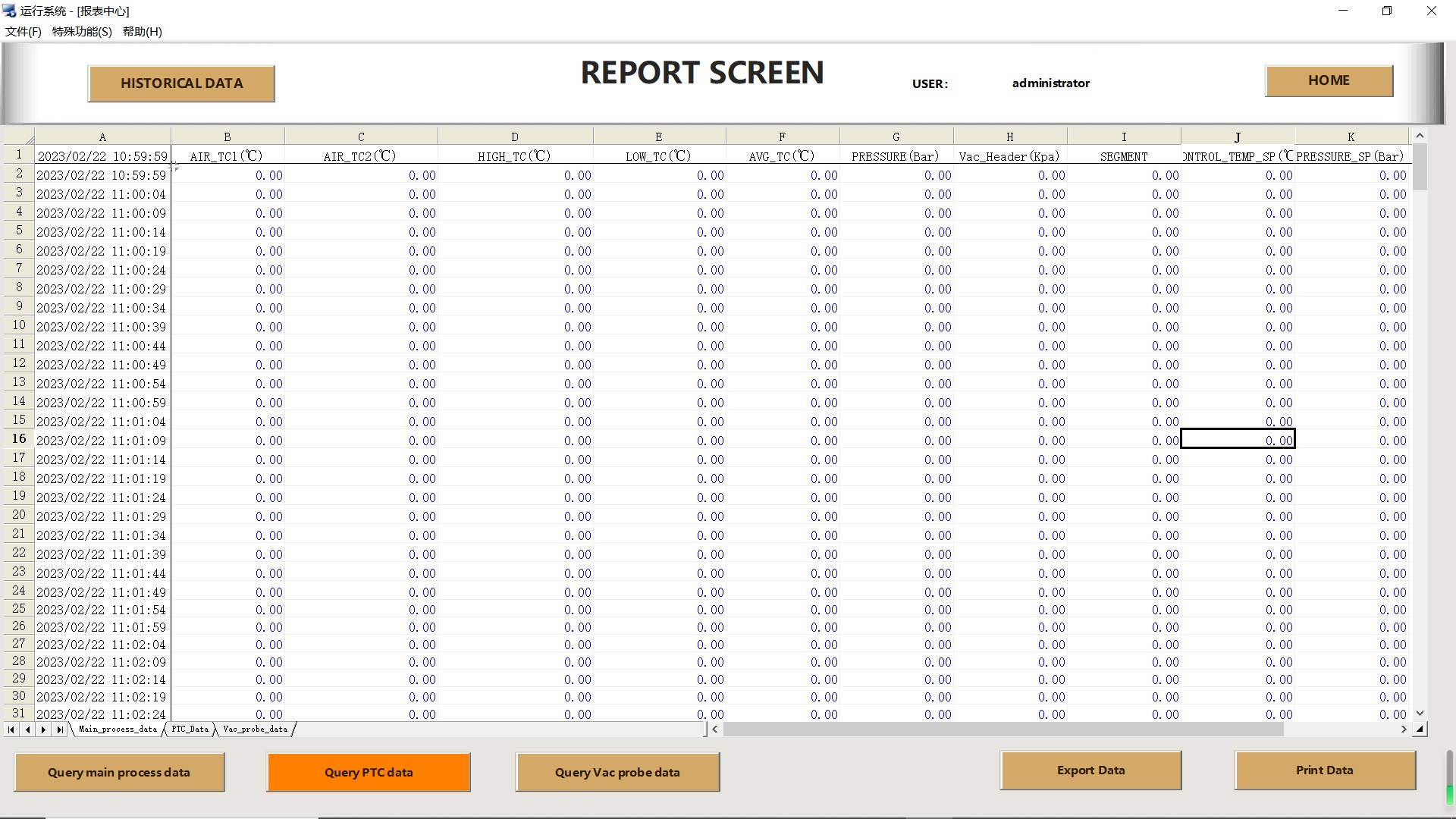
Flexible Data Filtering & Settings
Comprehensive settings are available to ensure report accuracy and relevance.
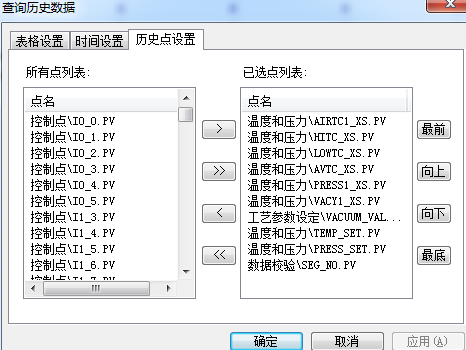
Table Settings: Users can check the Show Description box and define point descriptions for clearer and more intuitive report data.
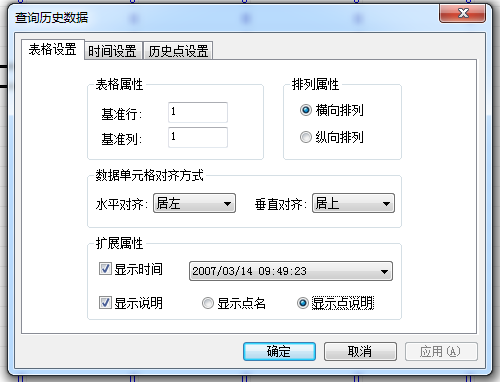
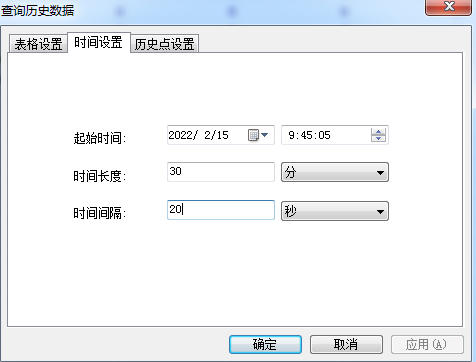
Time Settings: Customize the report's start time, time duration and interval to meet analytical needs across different time dimensions.
Historical Point Settings: Select specific data points from the sensor list for refined data extraction as needed.
Powerful Data Analysis Capabilities
The software not only enables report generation, but also integrates an advanced data analysis system to support in-depth analysis of process workflows for autoclaves, ovens and other equipment.
Data Analysis Screen: After loading a data file, the system instantly displays key operational information (date, time, recipe, product). Users can further view pre-operation integrity inspection reports (on-site checks, sensor checks, etc.) to ensure data reliability.
Multi-dimensional Data Viewing
Numeric Display Screen: For analyzing digital data. Users can select active sensors, main sensors or product-specific sensors for viewing. The system supports statistical calculation for the selected data range for quick insights.
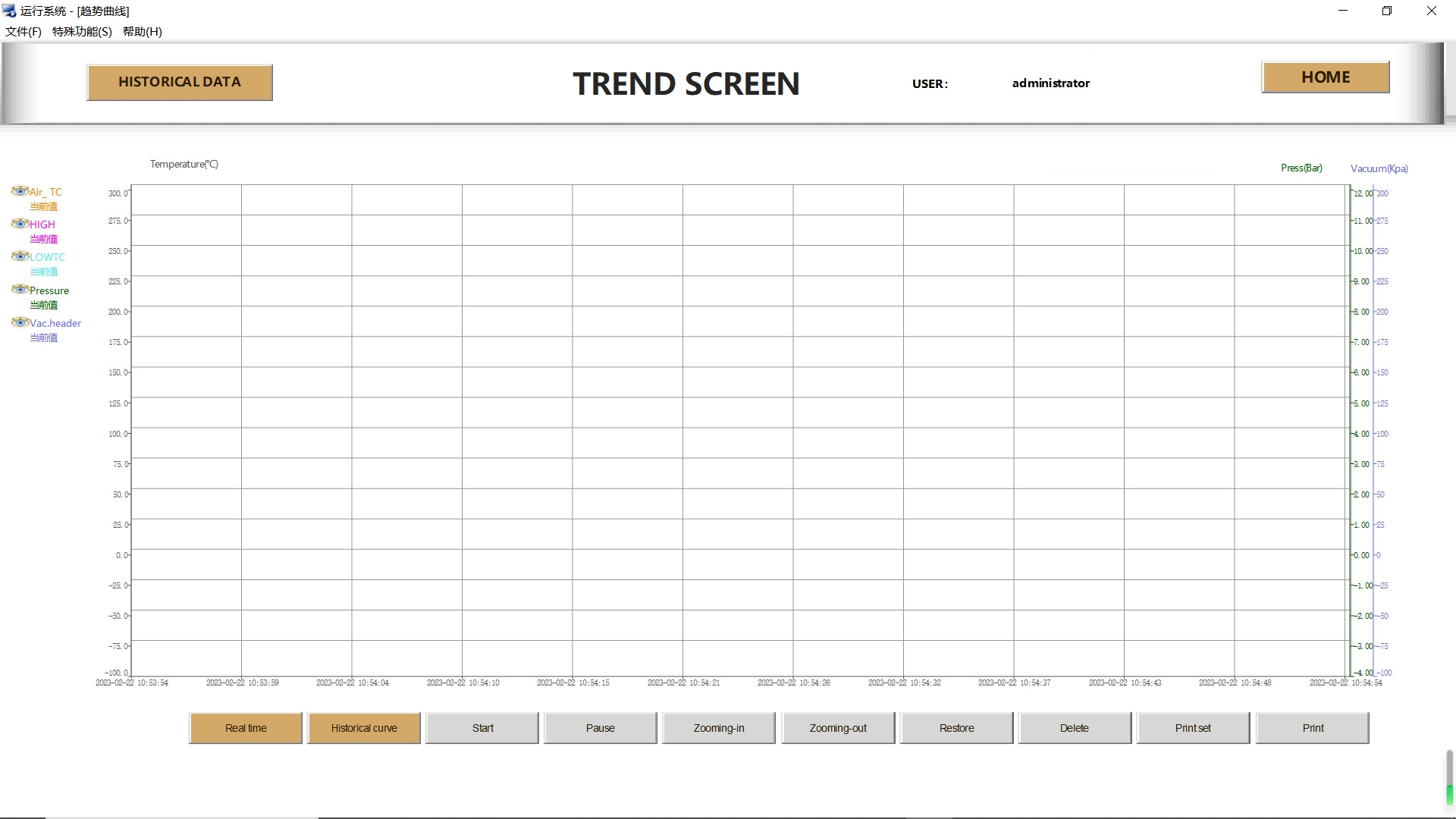
Trend Display Screen: Displays data changes via graphical trend lines. It supports custom sensor selection, display area zoom and pan. Users can even click and drag trend lines to identify the rate and value of specific data points, enabling intuitive process dynamic analysis.
Alarm Display Screen: Clearly categorizes and displays all operational information (blue for normal system info, green for manual intervention, red for alarms) for quick issue identification.
Professional & Diverse Report Types
The software supports generating a variety of professional reports, meeting reporting and auditing needs across different scenarios.
Recipe Display Screen: Shows the actual recipe used in operation; revised versions will be displayed if the recipe was modified with safety authorization during operation, ensuring full process traceability.
Comprehensive Report Options
Batch Report: Displays full information of all products, including attached thermocouples, vacuum sources, vacuum probes and pre-operation leak test results, ideal for overall overview.
Numeric Report: Provides interval numerical data, with the option to print data from all sensors, a single product or main sensors.
Trend Report: Presents data in trend graphs, supporting views for all products, a single product or main sensors.
Message Report: Compiles and displays all alarm and system information.
Intuitive Visualization & Interactive Experience
Screen Capture Report: Built-in screen capture generates digital and color trend reports for vivid, intuitive data presentation.
Easy Export, Printing & Sharing
Data Export: One-click export of reports or current digital grid data to Excel or CSV files, with user-friendly formats for subsequent offline analysis or system import.
Printing: Direct printing function for quick physical document generation.
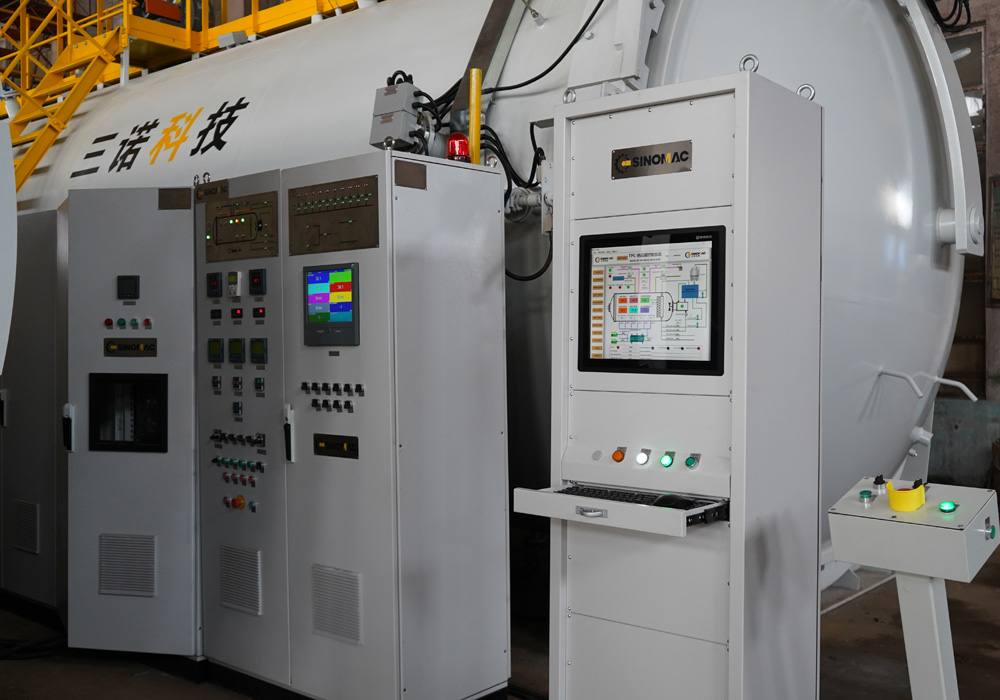
The TPC system supports redundant PC architecture. In a two-level redundant configuration, two PCs work collaboratively to provide primary and backup support for main process control: one acts as the primary controller, the other as the backup – which also functions as a real-time client station for monitoring and programming during primary PC operation. If a fault occurs on the primary (an extremely rare event), the backup seamlessly takes over control without manual intervention.
All data and configurations are automatically synced to the backup PC during primary operation, ensuring the backup can fully resume all original settings and data logging upon takeover. This mechanism guarantees that backup records of every operation are always stored on the secondary PC, even if the primary never malfunctions.
PLC Redundancy
For customers requiring higher redundancy levels, SINOMAC offers multiple hardware redundancy options. One solution adopts a PLC architecture with redundant processors and communication links connected to each PLC rack (requires specific PLC hardware and typically increases control system costs). For smaller autoclaves or ovens, a complete backup PLC rack and processor can be configured to switch automatically to the backup system in the event of PLC hardware failure.
Manual Setpoint Controllers & Chart Recorders
Based on the high reliability of the dual-PC redundant system, SINOMAC generally does not recommend additional independent setpoint controllers and chart recorders. Such devices have limited functionality, require integration with the main PLC, and cannot deliver even the basic advanced control capabilities of the PC system. They also incur extra annual maintenance and calibration costs. We therefore recommend the two-level dual-PC system as the primary redundancy solution, instead of setpoint controller and recorder combinations.
The TPC system is equipped with a robust, proven product temperature control algorithm validated over 20 years. Through cascade control, rate control and multiple limiting mechanisms, it delivers unparalleled precision in controlling product temperature and heating rate.
Cascade Control
Integrated with a product temperature control group, the system adopts a proportional cascade algorithm. It drives the product temperature back to the target trajectory by setting the air temperature of the autoclave/oven to a specific value higher than the product temperature. Cascade parameters can be recipe-customized for different loading conditions and product configurations.
Temperature Control Point Selection
The temperature controller can be programmed to select control targets: maximum temperature, minimum temperature, average value, median value, or a specific product thermocouple. For advanced applications, the TPC system can be configured to control via selected thermocouple groups at different curing stages, ideal especially for the curing of large main structural components.
Limit Protection
The TPC system provides configurable limiting parameters, including maximum air temperature, maximum air-product temperature difference, and air temperature variation limits based on current set values, ensuring process safety.
Gradient Control
The system supports configurable real-time thermal gradient monitoring and control. It can monitor temperature distribution for a single product or the entire load, and maintain the gradient below the set upper limit by adjusting the heating rate. This function is mainly used for aerospace parts such as satellite components to prevent structural stress caused by thermal gradients.
Rate Control
Cascade control is sufficiently efficient under normal conditions. For closed-loop rate control requirements, the TPC system is equipped with an advanced rate controller that enables real-time regulation to maintain a stable product heating rate. This algorithm can quickly respond to rate fluctuations caused by exothermic reactions or pressure changes, ensuring process consistency.
The TPC system generates complete data logs during each operation, covering all process data including product information, recipe parameters, alarm records and pre-operation reports.
Data Storage
The TPC system uses compressed binary files (called "data files") as the standard data storage method. An independent data file is created at the start of each operation, storing all recipe, product, alarm and sensor data. Upon operation completion, the file contains all information required for curing process analysis and reporting. Unlike competitor solutions that rely primarily on database storage, the TPC system can be configured for database storage but prioritizes data files as the superior option – they are small in size, easy to store and archive, and can be seamlessly shared with partners, management or customers for analysis, whereas database content is difficult to extract and transfer directly.
Complete Information Logging
During the curing cycle, the TPC system not only collects temperature, pressure and vacuum data, but also records all other relevant information including product details, accessory information, integrity inspection reports, alarm logs and the full actual recipe used. Data files ensure 100% integrity, providing quality and engineering personnel with all required information for subsequent analysis and process validation.
Remote Archiving Support
The TPC system typically stores data locally on a hard drive first, then transmits it to remote storage upon operation completion. This method is stable and reliable, less susceptible to customer network issues, and allows for customized archiving settings by the customer.
Customizable Configuration
The TPC system features high flexibility, meeting nearly all customer customization requirements for data collection.
The I/O Diagnostics interface enables operators and maintenance staff to quickly identify and resolve equipment faults, minimizing downtime losses. With user authorization, the system also supports remote diagnostic services—our team can analyze equipment status via operational logs and pre-set test procedures to troubleshoot potential issues proactively and prevent unplanned production interruptions.
The system allows selection and storage of different curing processes, displays real-time and historical trends of pressure, vacuum and temperature, and stores all processing data with a paperless logging function to generate reports of process curves and parameters.
Object-Oriented Flexibility
The TPC system features robust object-oriented configuration capabilities, a built-in scripting language and custom screen design tools, providing SINOMAC engineers and customer developers with a complete toolkit to create all types of customized interfaces.
Advantages

Precise Control
Unique control algorithm ensures accurate temperature & pressure control, reduces overshoot, cuts cooling/air consumption and lowers energy use.

Easy Maintenance
Powerful maintenance interface with open core parameters allows direct on-site adjustment, less manufacturer dependency and higher efficiency.

Safe & Reliable
Intelligent fault handling (thermocouple break exclusion, vacuum leak cut-off, etc.) guarantees safe unattended operation and full process completion.

Remote Support
Built-in I/O diagnostics for fast troubleshooting. Authorized remote diagnosis, data analysis and early fault warning avoid unexpected downtime.
Parameters
PLC + touch screen, supports air and mold temperature control (max, average, min), adjustable vacuum. Optional recorder and printer.
PLC + touch screen + industrial PC, supports air and mold temperature control (max, average, min), adjustable vacuum, automatic vacuum leak detection. Optional recorder and printer.
PLC + touch screen + redundant computer, supports air and mold temperature control (max, average, min), adjustable vacuum, automatic vacuum leak detection. Optional recorder and printer.
PLC + touch screen + computer + redundant instrument, supports air and mold temperature control (max, average, min), adjustable vacuum, automatic vacuum leak detection. Optional recorder and printer.
Related cases
View more +
Related products
View more +-
Brief of TPC System
TPC software is a dedicated control system for autoclave composite curing, based on the Microsoft Windows platform. Developed by SINOMAC by integrating the strengths of various domestic and international control systems, it is highly popular among customers. The system comes with essential functions, including user permission login, component sensor selection, curing curve process setting, recall, saving and printing, automatic and manual process execution, real-time data monitoring, recording, saving and printing, alarm, quality analysis, and report generation. Since its launch, the TPC control system has been updated annually to meet the evolving requirements of the composite industry. With reliable performance and powerful functions, it is a trustworthy application solution for customers.
-
Functions of Software
TPC software is a dedicated control system for autoclave composite curing based on the Microsoft Windows platform. Developed by SINOMAC by drawing on the strengths of various domestic and international control systems, it is a highly popular control system among customers, with basic functions including user permission login, component and sensor selection, curing curve recipe setting, recall, saving and printing, automatic and manual recipe execution, real-time data monitoring, recording, saving and printing, as well as alarm, quality analysis and report generation. The TPC control system has been updated annually since its launch to meet the evolving requirements of the composite industry. With reliable performance and powerful functions, it is a trustworthy application solution for customers.
-
Construction and Design of System
The TPC software is a Microsoft Windows-based control system exclusively developed for composite curing in autoclaves. R&D by SINOMAC, it integrates the advantages of various domestic and international control systems and is a highly popular solution among customers. The system features core functions including user permission login, component & sensor selection, curing curve process setting/calling/saving/printing, automatic/manual process execution, real-time data monitoring/recording/saving/printing, alarm notification, quality analysis and report generation. Updated annually since its launch to meet the evolving demands of the composite industry, the TPC control system is a reliable, high-performance solution customers can trust.
Full service
View more +SINOMAC Promises:
12months
free maintain service since delivery
24hours
a day online customer service
365days
a year with no rest

Selection Guidance

Online Maintenance

Genuine Parts

Commissioning
SINOMAC Strength
View more +SINOMAC provides you with the advanced autoclave turn-key solutions!
Changzhou SINOMAC Machinery Technology Co. Ltd. is located in the hometown of autoclave, Changzhou, Jiangsu Province. It is specialized in providing energy efficient autoclave, corollary equipments for production line, and projects of intelligent production. The autoclave developed and produced by our company is in a leading role in domestic market, and it is widely used in many different areas, such as composites curing, safety glass laminating, photovoltaic module encapsulation, wood carbonization, rubber vulcanization, industry chemicals synthetisis, and so on.
We focus on satisfying different needs from global customers. All the products can be produced according to ASME, PED, AD-2000 standards, and we will also provide relevant certificate and code to make sure its quality and safety. At present, our autoclave has been sent to America, Canada, Russia, Australia, New Zealand, France, Brazil, Venezuela, Saudi Arabia, and Tunis.
Need more information?
01 Provide Requirements
02 Phone Coordination
03 Custom Solution